> For the complete documentation index, see [llms.txt](https://help.lynda.ru/llms.txt). Markdown versions of documentation pages are available by appending `.md` to page URLs; this page is available as [Markdown](https://help.lynda.ru/novyi-redaktor-3.0/rabota-v-pro-rezhime/stilizaciya-bloka/stili.md).

# Стили

<figure><img src="/files/ZKWnMtL6Z330PtXA9ZUh" alt=""><figcaption></figcaption></figure>

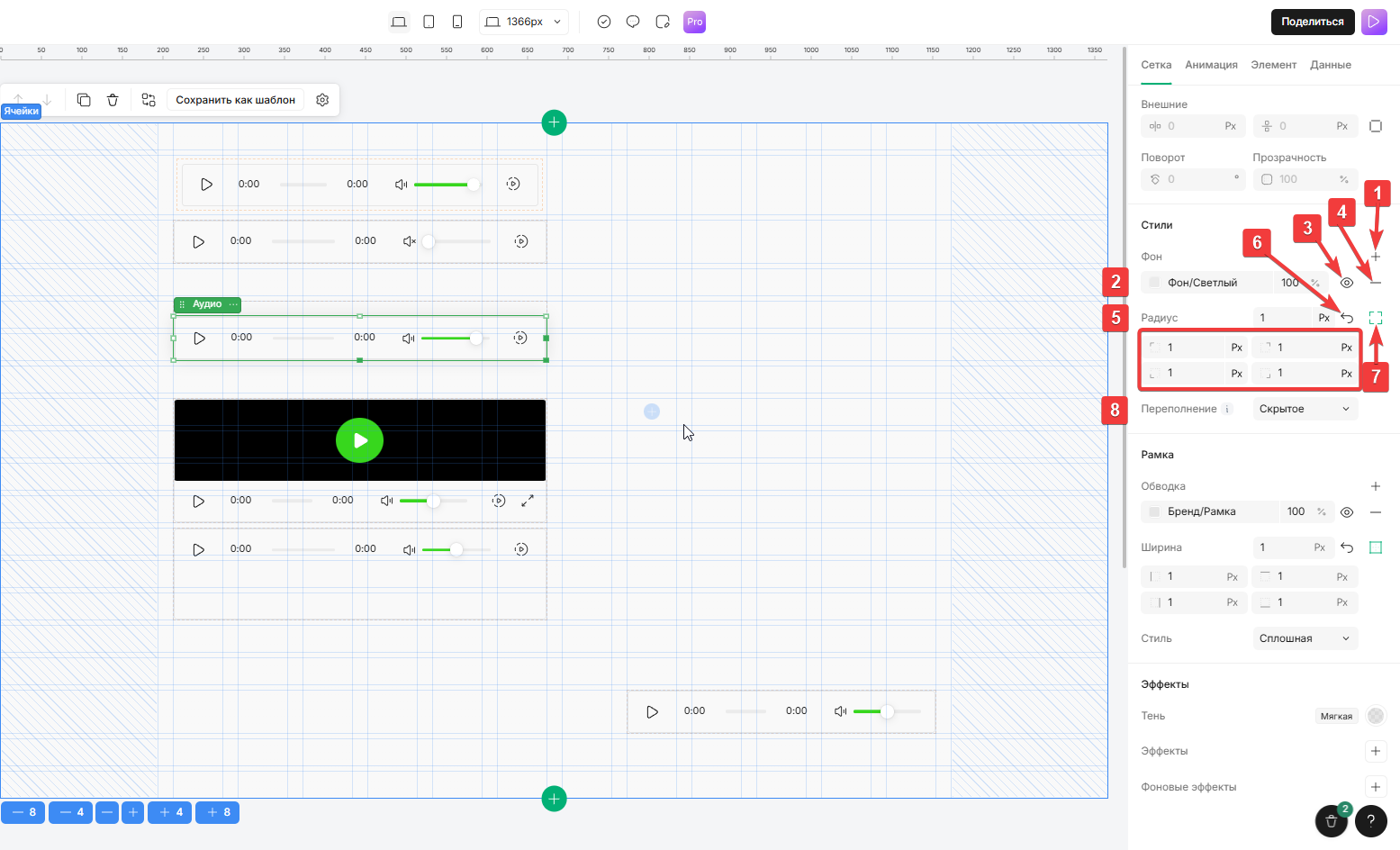
1. **Добавить фон**\
   &#x20;   *Нажмите на значок «Добавить фон (***＋***)» , чтобы добавить до 10 фоновых слоев, включая: Сплошные цвета, Градиенты, Несколько слоёв*\
   &#x20;   <mark style="color:$primary;">Добавление фона к элементу</mark>
2. **Цвет фона**\
   &#x20;   *Нажмите на поле, чтобы выбрать цвет фона и его интенсивность, используя шестнадцатеричный код цвета или выбрав оттенок из палитры, или из списка цветов фирменного стиля*\
   &#x20;   <mark style="color:$primary;">Установка нужного цвета для фона</mark>\
   &#x20;   <mark style="color:$info;">Используйте фирменные цвета из дизайн‑системы для единообразия</mark>
3. **Скрыть/показать цвет фона**\
   &#x20;   *Нажмите на значок «глаз» , чтобы скрыть/показать фон*\
   &#x20;   <mark style="color:$primary;">При нажатие скрывает/показывает фон</mark>
4. **Удаление фона**\
   &#x20;   *Нажмите на значок удаления «—», чтобы удалить фон*\
   &#x20;   <mark style="color:$primary;">Сброс и удаление фона</mark>
5. **Радиус скругления углов**\
   &#x20;   *Укажите одинаковый радиус скругления углов для всех углов в пикселях или в процентах от размера родительского блока*\
   &#x20;   <mark style="color:$primary;">Установка радиуса скругления углов</mark>
6. **Сброс радиуса скругления углов**\
   &#x20;   *Нажмите на значок «Авто» , чтобы сбросить значение радиуса скругления углов*\
   &#x20;   <mark style="color:$primary;">Установка стандартного радиуса скругления</mark>
7. **Радиус определённых углов**\
   &#x20;   *Нажмите на значок «Индивидуальный радиус скругления углов» и укажите значения*\
   &#x20;   <mark style="color:$primary;">Установка скругления для каждого угла по-отдельности в градусах</mark>
8. Переполнение\
   &#x20;   *Выберите вариант переполнения из выпадающего меню: Видимое, Скрытое, Прокрутка, Авто*\
   &#x20;   <mark style="color:$primary;">При выходе элемента за пределы границ, устанавливает поведение:</mark>\
   &#x20;   <mark style="color:yellow;">Видимое</mark> <mark style="color:$primary;">- Расширяет содержимое за пределы границ контейнера</mark>\
   &#x20;   <mark style="color:yellow;">Скрытое</mark> <mark style="color:$primary;">- Обрезает содержимое по границам</mark>\
   &#x20;   <mark style="color:yellow;">Прокрутка</mark> <mark style="color:$primary;">- Добавляет полосы прокрутки независимо от содержимого</mark>\
   &#x20;   <mark style="color:yellow;">Авто</mark> <mark style="color:$primary;">- Отображает полосы прокрутки только при необходимости</mark>


---

# Agent Instructions
This documentation is published with GitBook. GitBook is the documentation platform designed so that both humans and AI agents can read, navigate, and reason over technical content effectively. Learn more at gitbook.com.

## Querying This Documentation
If you need additional information that is not directly available in this page, you can query the documentation dynamically by asking a question.

Perform an HTTP GET request on the current page URL with the `ask` query parameter, and the optional `goal` query parameter:

```
GET https://help.lynda.ru/novyi-redaktor-3.0/rabota-v-pro-rezhime/stilizaciya-bloka/stili.md?ask=<question>&goal=<endgoal>
```

`ask` is the immediate question: it should be specific, self-contained, and written in natural language.
`goal` is optional and describes the broader end goal you are ultimately trying to accomplish on behalf of the user. GitBook uses it to tailor the answer towards what is most useful for that goal.

The response will contain a direct answer to the question and relevant excerpts and sources from the documentation.

Use this mechanism when the answer is not explicitly present in the current page, you need clarification or additional context, or you want to retrieve related documentation sections.